
Legal
SMS & Voice Notification Terms
Effective October 9, 2026
1. How You Opt In
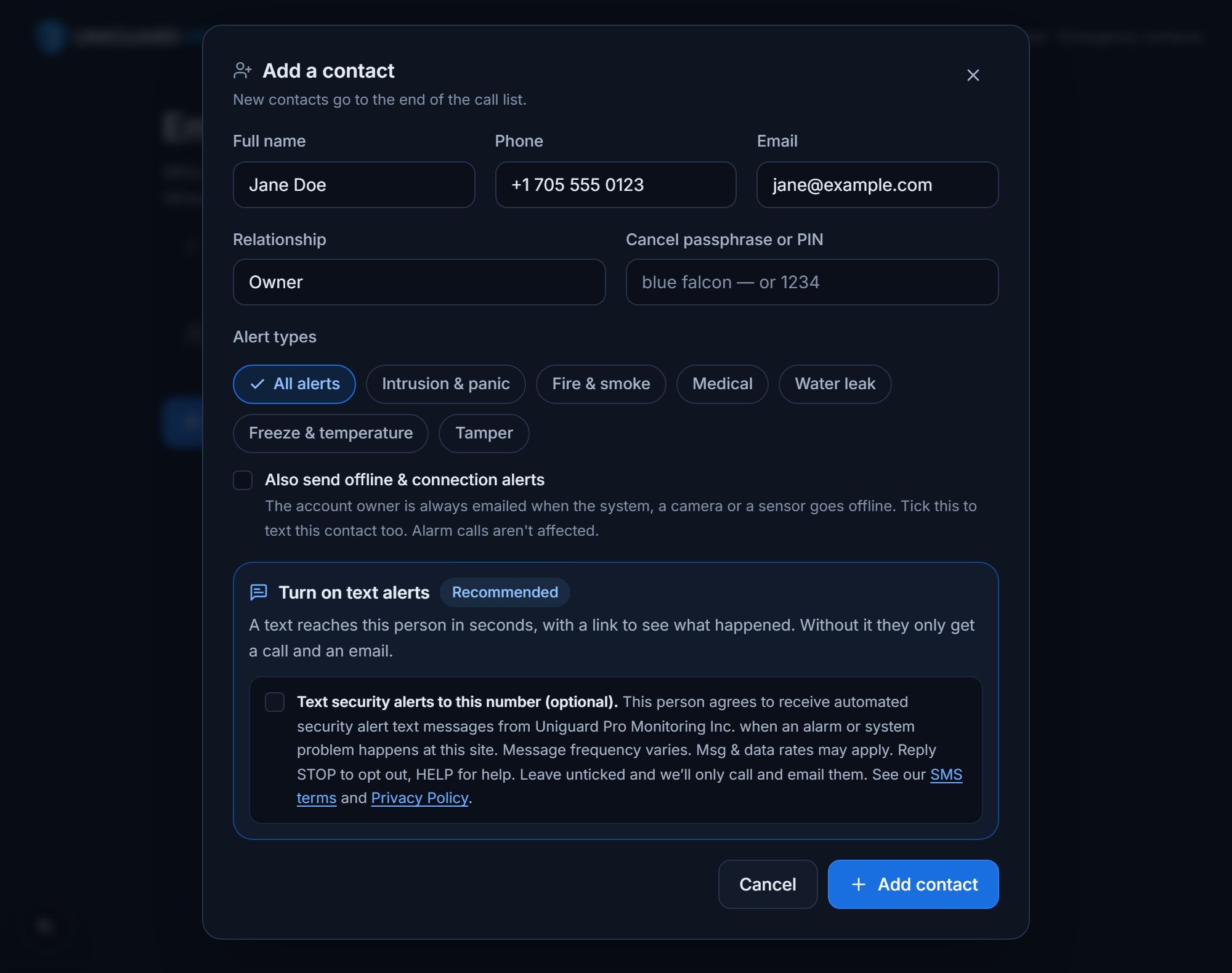
Texting is optional. A phone number gets security alert texts from Uniguard Pro Monitoring Inc. (“Uniguard Pro”) only when the box below is ticked as that person is added as an emergency contact, by the account holder or the security dealer setting up the account. The box starts unticked, and it is separate from accepting our Terms of Service and Privacy Policy.
Contacts who are not opted in still receive alarm phone calls and emails. Agreeing to texts is not a condition of buying any product or service.
When an account holder or dealer ticks the box for someone else, they confirm that person has agreed to receive these texts. The first text we send is a welcome message that says why they are receiving texts and how to reply STOP.

2. What We Text
One program: security alerts for the site the person is an emergency contact for. That covers alarms (for example a door, motion or smoke alarm), updates while an alarm is being handled (help dispatched or cancelled), and system problems that affect monitoring, such as the security system going offline.
We do not send marketing or promotional texts. Product news is sent by email only, with its own opt-in. If you choose text message sign-in codes for your own account login, we send a code only when you request one.
3. Frequency & Timing
Typical volume: 0 to 10 messages per month for an average residential or small commercial site. An alarm may produce additional messages until it is resolved.
Timing: Security alerts are sent as soon as the event happens, 24 hours a day, 7 days a week.
4. Message & Data Rates
Message and data rates may apply. Uniguard Pro does not charge a per-message fee for SMS or voice notifications, but your wireless carrier may charge for messages received based on your plan. Contact your carrier for details on text and voice rates applicable to your account.
Carriers (including but not limited to AT&T, Verizon, T-Mobile, Bell, Rogers, and Telus) are not liable for delayed or undelivered messages.
5. Opt-Out Instructions
You may stop receiving SMS messages from Uniguard Pro at any time. Choose the method that suits you:
- Reply
STOPto any message we send you. You will receive a single confirmation message acknowledging your opt-out, then no further SMS communications. - Call our support line at (833) 486-0846.
- Email [email protected].
- Manage notification preferences directly from your account dashboard’s Contacts page.
Important: opting out of SMS means you will no longer receive automated security-event notifications via text. We strongly encourage you to maintain at least one active SMS or voice contact so alarm events can reach you in real time. Consider switching to voice-only notifications rather than disabling all alerts.
To re-enable SMS after opting out, reply START or UNSTOP to any prior message, or update your preferences in the dashboard.
6. Help & Support
For help with our SMS service, reply HELP to any message and we’ll respond with contact options. You can also reach our support team directly:
- Phone: (833) 486-0846 (24/7)
- Email: [email protected]
- Live chat from your account dashboard
7. Data Handling
Uniguard Pro collects only the information necessary to deliver security notifications: your phone number, the names and phone numbers of emergency contacts you designate, and event metadata (timestamps, site identifiers, alert types).
We use your phone number exclusively for the security and account-administration purposes described above. We never sell, rent, or share your phone number with third-party advertisers. Phone numbers may be transmitted to authorized sub-processors (Twilio for SMS delivery, Noonlight for emergency dispatch) strictly to fulfill the notification service.
All SMS and voice transmissions are encrypted in transit (TLS to the carrier gateway). We retain records of sent notifications for the duration of your account plus 12 months for billing reconciliation, dispatch audit, and regulatory compliance.
Full details of how we collect, store, and protect your data are available in our Privacy Policy.
8. Changes to These Terms
Uniguard Pro may update these SMS and voice notification terms from time to time. We will post the updated terms at this URL with a revised effective date. Material changes that expand the categories of messages you receive or modify the opt-out process will be communicated to active customers via email at least 30 days before they take effect.
Continued use of the service after the effective date of updated terms constitutes acceptance of those terms.